Introduction
The modern computing landscape has shifted dramatically over the last decade. We no longer live in a world where software lives exclusively on a hard drive; instead, the vast majority of our daily tasks—from word processing and project management to complex graphic design and communication—are performed within a browser. This evolution has fundamentally changed the requirements for an ideal operating system. The old metrics of raw CPU power and local storage capacity are less relevant than how seamlessly a platform can connect to and run cloud-based software.
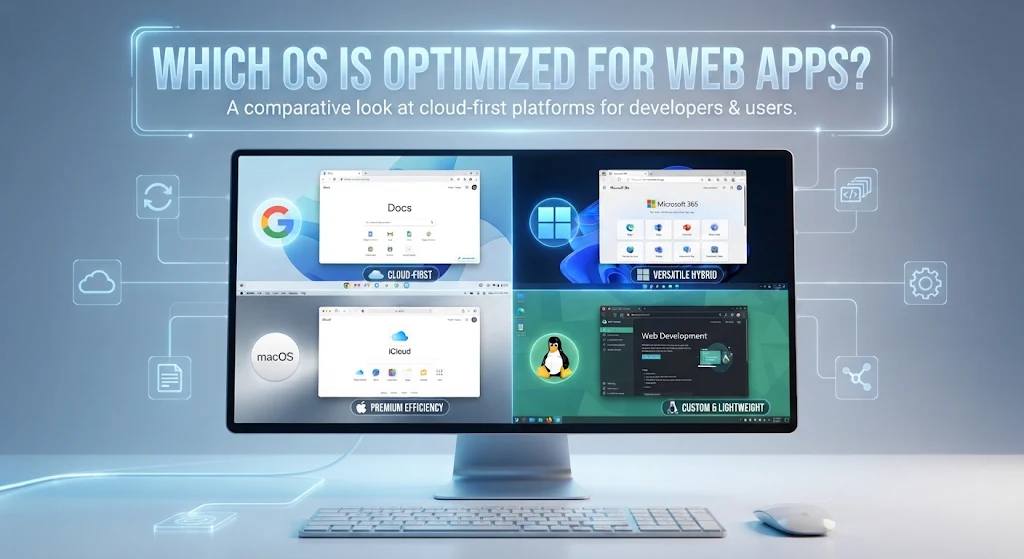
This new paradigm raises an important question for both casual users and professional developers: Which OS is optimized for web apps today? An optimized operating system for this purpose isn’t just one that runs a browser; it is one that minimizes overhead, prioritizes browser-based workflows, integrates cloud storage at the kernel level, and provides a robust environment for building and testing these applications. While any modern system can run a web application, some platforms offer a friction-free experience that feels more cohesive and modern. This article explores the leading contenders, analyzing their strengths and weaknesses to determine which operating system truly excels at delivering a superior web application experience in 2025 and beyond.
Comparison of Operating Systems for Web Application Performance
The Case for Chrome OS: The Cloud-Native Contender
When evaluating which OS is optimized for web apps, it is impossible to ignore Chrome OS. Google has built this operating system from the ground up with the singular vision that the web browser is the primary interface for computing. Unlike traditional systems that treat the browser as just another application, Chrome OS makes the browser the central environment. This architectural difference is significant. Because the system does not need to manage the overhead of a traditional desktop environment, legacy APIs, and complex background services, it runs with incredible efficiency. This lightweight nature translates directly into snappy performance for web applications, even on hardware that would struggle to run other operating systems effectively.
Furthermore, Chrome OS has pioneered deep integration for Progressive Web Apps (PWAs). These applications can be “installed” and run in their own windows, separate from the browser tabs, appearing in the app launcher and dock just like native software. Google’s operating system handles this transition seamlessly, often blurring the line between web and native experiences better than any other platform. For users who live entirely within Google Workspace, Microsoft 365, and various SaaS platforms, a Chromebook offers an unparalleled level of integration and simplicity. While it may not be the best choice for heavy video editing or local gaming, its singular focus on web-based workflows makes it the most streamlined option for this specific purpose.
Windows: The Versatile Powerhouse for Hybrid Workflows
Microsoft Windows remains the dominant desktop operating system globally, and its approach to web apps is one of robust versatility. While not “cloud-first” in the same way as Chrome OS, Windows has made significant strides in optimizing its environment for modern, browser-based computing. Recognizing that most businesses operate in a hybrid environment—using both legacy desktop software and modern web-based tools—Microsoft has ensured that Windows provides a stable and performant platform for both. The integration of Microsoft Edge, built on the same Chromium engine as Google Chrome, ensures excellent compatibility and performance for virtually all modern web applications and PWAs.
Windows excels in its management of Progressive Web Apps, allowing them to be pinned to the taskbar and managed through the standard Settings app, providing a very similar experience to native application management. Moreover, for users who require powerful offline functionality, Windows offers a superior file system and local application ecosystem that complements web app usage. For instance, working on a large Excel spreadsheet in the desktop app while simultaneously managing projects in Asana (a web app) is a workflow where Windows shines. It provides the power to handle resource-intensive local tasks without sacrificing the seamless integration of modern cloud services. For a broad spectrum of users who need the best of both worlds—traditional desktop power and modern web-based efficiency—Windows remains a highly optimized and reliable choice.
macOS: The Premium Unix-Based Platform for Efficiency
Apple’s macOS has long been a favorite among creative professionals and developers, and it also offers a highly optimized environment for running web applications. Underneath its polished user interface lies a robust Unix-based operating system, which provides a level of stability and performance that is highly conducive to smooth web browsing and application usage. Apple’s hardware-software integration ensures that Safari, the native browser, is incredibly efficient, often delivering better battery life and smoother scrolling than competing browsers on other platforms. Of course, macOS users are free to install Chrome, Firefox, or Edge, all of which perform excellently on Apple’s powerful silicon.
From a web app integration perspective, macOS offers a clean and polished experience. Like Windows, it supports the installation of PWAs via modern browsers, treating them as first-class citizens in the Dock and Launchpad. The optimization also extends to the ecosystem level. A user can start a task in a web app on their iPhone or iPad and instantly pick it up on their Mac via Handoff, a level of continuity that few other operating systems can match. While macOS is a powerful platform in its own right, its efficiency and clean Unix underpinnings make it feel incredibly fast and responsive when dealing with the demands of a modern, browser-centric workload. For users who value a premium user experience and a balance of power and efficiency, macOS is a compelling option.
The Linux Advantage: Freedom, Control, and Lightweight Performance
Linux, often overlooked in the mainstream consumer conversation about which OS is optimized for web apps, actually offers a unique and powerful proposition. The key advantage of Linux lies in its inherent flexibility and efficiency. Because the operating system is modular, users can choose a lightweight desktop environment (like XFCE or LXQt) that consumes minimal system resources, leaving the vast majority of the CPU and RAM available for the web browser and its myriad of open tabs and applications. This makes Linux an excellent choice for breathing new life into older hardware, transforming it into a snappy, web-focused workstation that can outperform more bloated systems.
In terms of web app support, modern Linux distributions offer the same strong capabilities as Windows and macOS through browsers like Google Chrome and Firefox, allowing for the installation and management of PWAs. However, where Linux truly shines is not just for the end-user but for the web developer. Because the vast majority of web applications and cloud services are deployed on Linux servers, developing on a Linux desktop provides a native environment that mirrors the production infrastructure. This eliminates many compatibility headaches and streamlines the development and testing workflow. For developers and users who prioritize control, customization, and the ability to optimize every ounce of performance from their hardware, Linux presents a highly capable and attractive alternative.
Essential Questions for Choosing Your Ideal Web-Centric OS
Selecting the right operating system often comes down to asking the right questions about your specific needs and workflows. While the platforms discussed all offer excellent web app capabilities, one may be a better fit for you than another. Here are a few critical factors to consider:
-
What is the nature of your work? Do you operate entirely within web browsers and cloud-based SaaS tools (e.g., Google Workspace, Salesforce, Slack in the browser)? If yes, a streamlined platform like Chrome OS might be the most efficient and hassle-free choice. If you require a mix of web apps and powerful local desktop software (e.g., Adobe Creative Cloud, specialized engineering software), Windows or macOS will provide the necessary versatility.
-
What is your hardware budget and situation? Are you working with older, less powerful hardware or a limited budget? Linux (with a lightweight desktop environment) or Chrome OS (on a Chromebook) will likely deliver a smoother web app experience by minimizing system overhead. If you have a robust, modern machine, Windows and macOS will run web apps beautifully alongside other tasks.
-
Are you a web developer? If so, Linux offers a native development environment that aligns perfectly with server-side deployment. macOS is also an excellent choice, favored by many developers for its Unix foundation and ease of use. Windows has also become a powerful contender for web development through WSL2 (Windows Subsystem for Linux), which brings a full Linux kernel to the Windows environment.
-
Do you live in an ecosystem? Do you rely heavily on an iPhone, iPad, or other Apple devices? The continuity and Handoff features of macOS make it the most logical and friction-free extension of that mobile experience for running web-based services.
Conclusion:
The question of “Which OS is optimized for web apps?” does not have a single, universally correct answer. Instead, the “best” operating system depends entirely on your individual needs, your hardware, and the balance you strike between cloud-based services and local applications. The computing world has evolved to a point where the operating system is less about the programs you install and more about the platform that connects you to the information and tools you need to be productive.
For those who have fully embraced the cloud-first philosophy, Chrome OS offers an experience that is pure, efficient, and deeply integrated with modern web workflows. It strips away the complexities of legacy systems to provide a fast, secure, and streamlined environment. At the other end of the spectrum, users who demand the utmost flexibility and control will find a powerful ally in Linux, which can be customized to be incredibly lightweight or serve as a robust development powerhouse. Windows and macOS sit comfortably in the middle, providing mature, versatile, and high-performance platforms that excel at bridging the gap between traditional computing needs and the modern, browser-centric digital lifestyle. Ultimately, the best operating system for you is the one that gets out of your way and allows you to work, create, and connect with the greatest possible ease.