Introduction
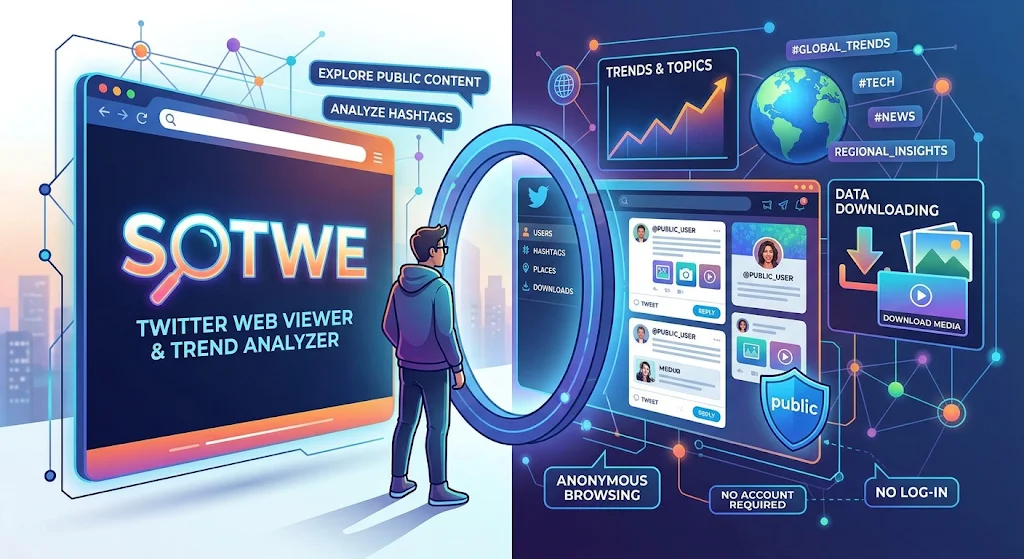
Navigating modern social media platforms often requires creating accounts, logging in, and agreeing to extensive data-tracking policies before viewing even a single public post. For users who prefer quick, friction-free access to public microblogging updates, third-party web viewers have become a popular alternative. Among these browser-based utilities, Sotwe stands out as a lightweight web interface designed to display public posts, trending hashtags, and user profiles without requiring visitors to sign into an official social network account.
People searching for information about this tool typically want to understand what it actually does, whether it is safe to use, and how it differs from official mobile applications. Because third-party social viewers sit at the intersection of convenience, public data indexing, and online privacy, knowing their capabilities and limitations is essential. This guide breaks down how the platform operates, its practical benefits for casual researchers and readers, potential privacy or security considerations, and best practices for browsing public social feeds safely.
Comparing Web Viewers and Official Social Platforms
How Browser-Based Social Viewers Operate
Third-party social media viewers function as intermediary web interfaces that retrieve and organize publicly accessible posts from major microblogging networks. Rather than hosting original user-generated content on their own servers permanently, these platforms query public endpoints or cached web indexes to present profiles, threads, and multimedia in a clean, streamlined layout.
When a visitor enters a username or hashtag into the search bar, the web application fetches the corresponding public timeline and renders it inside a standard browser window. Because the interface strips away heavy interactive scripts, notification badges, and account prompts, pages often load quickly even on slower internet connections or older devices. For example, a journalist verifying a public statement or a reader checking breaking news updates can view an entire thread chronologically without hitting a login wall or creating a burner account.
Key Benefits for Casual Readers and Researchers
The primary appeal of an account-free social viewer lies in its simplicity and speed. Many internet users want to read public announcements, follow live event hashtags, or check brand updates without maintaining an active social media profile or receiving constant email notifications. Removing the registration barrier saves time and keeps personal inboxes free from promotional clutter.
Digital researchers, marketers, and content curators also benefit from this uncluttered browsing environment. When analyzing competitor announcements or tracking regional trending topics, official apps often tailor search results based on a user’s past clicks, location, and engagement history. Viewing public feeds outside of a logged-in profile provides a more neutral, unpersonalized snapshot of what is trending globally or within a specific topic category, making trend observation faster and more objective.
Limitations of Read-Only Web Interfaces
While account-free viewing offers clear convenience, it comes with inherent functional boundaries that users should understand before relying on it daily. First and foremost, these platforms operate strictly in a read-only capacity. Visitors cannot publish new updates, reply to ongoing discussions, bookmark posts to a cloud profile, or send direct messages to content creators.
Additionally, visibility is strictly limited to accounts that have set their profiles to public. Any posts shared by protected or private accounts remain completely inaccessible, as third-party viewers cannot bypass standard account privacy permissions. Reliability can also fluctuate whenever the underlying social network updates its application programming interfaces (APIs) or rate-limiting rules. During major platform updates, third-party viewers may experience temporary delays in loading recent replies, high-resolution videos, or real-time search results.
Privacy Considerations and Data Footprint
Browsing public feeds without logging into a primary social media account naturally reduces the amount of personal identity data tied to your reading habits. Because you are not signing in with an email address, phone number, or linked profile, the main social network cannot directly associate your viewing history with your real-world identity or social graph.
However, using any third-party website still involves standard web traffic interactions. The intermediary site itself can log standard technical metadata such as your IP address, browser type, device resolution, and search queries through server logs or third-party advertising scripts. Many free web utilities rely on display advertisements to cover server and bandwidth costs, which means third-party ad networks may place tracking cookies in your browser unless you use built-in privacy controls or content blockers.
Security Best Practices for Safe Browsing
Whenever you use an unofficial web interface to browse social content, adopting basic digital hygiene protects your device and personal information. Because third-party sites are not affiliated with or audited by the original social media companies, users should never enter their official social network username or password into any external viewer claiming to unlock extra features.
To maintain a secure browsing session, verify that the website uses an encrypted HTTPS connection before interacting with the search bar. Running an updated web browser equipped with reputable ad-blocking and anti-tracking extensions minimizes exposure to intrusive pop-ups or deceptive download buttons. If you choose to save public images or videos for offline reference, ensure the downloaded files match standard media formats like JPG, PNG, or MP4 rather than executable files.
Navigating Content Moderation and Copyright Rules
Because web viewers mirror content directly from open social feeds, the material displayed reflects whatever is currently live on the source platform. While major networks employ automated filters to remove illegal or harmful material, users exploring unfiltered trending tags may occasionally encounter sensitive discussions, unverified rumors, or mature media that lacks the strict warning labels found inside official mobile apps.
Copyright awareness is equally important when saving or sharing media discovered through a public viewer. Just because a photograph, graphic, or video clip is publicly viewable without a login screen does not mean it sits in the public domain. Content creators retain copyright ownership over their original work, so any media saved for commercial projects, blog posts, or presentations still requires proper attribution or explicit permission from the original author.
Choosing the Right Tool for Your Browsing Habits
Deciding whether to use an external web viewer or an official social platform depends entirely on how you interact with online communities. If your goal is active participation—such as networking with peers, building a personal brand, curating lists, or receiving instant alerts from favorite creators—an official account remains indispensable.
Conversely, if you treat social media strictly as an occasional news ticker or reference library, a lightweight web viewer fits naturally into a minimalist digital routine. Pairing browser bookmarks for specific public profiles with RSS readers or dedicated news aggregators allows you to stay informed about niche industries, sports updates, or public figures without getting pulled into endless algorithmic scrolling loops.
Frequently Asked Questions
Is Sotwe affiliated with official social media companies? No. It operates as an independent, third-party web viewer that displays publicly available posts and profiles from external social networks without official partnership or endorsement.
Do I need to create an account or log in to use it? No registration or login is required. Visitors can search for public usernames, browse trending hashtags, and read open threads directly through a standard desktop or mobile web browser.
Can I view private or protected accounts using a web viewer? No. Third-party viewers can only access information that is already set to public on the original social network. Protected profiles and private messages remain inaccessible.
Is it safe to browse public feeds on third-party viewer sites? Browsing public pages is generally safe as long as you never enter your personal social media login credentials, keep your browser updated, and use standard ad or tracker protection.
Why do some videos or posts occasionally fail to load? Third-party viewers rely on public data access and caching mechanisms. When the source social platform changes its technical infrastructure or restricts automated requests, certain media embeds or recent replies may temporarily fail to appear.
Conclusion
Accessing public social media conversations does not always require maintaining an active profile or navigating complex app interfaces. Throughout this guide, we examined how Sotwe functions as a streamlined, read-only web viewer, highlighting its advantages for quick research, neutral trend checking, and account-free browsing alongside its natural limitations regarding interaction and private content.
For everyday internet users, the smartest approach is balancing convenience with thoughtful privacy habits. Use third-party web viewers when you want fast, distraction-free access to public announcements, but keep your browser protected with strong anti-tracking settings and never share account passwords outside official login portals. By understanding how public web indexes work and respecting content ownership rules, you can stay informed across social channels efficiently and safely.