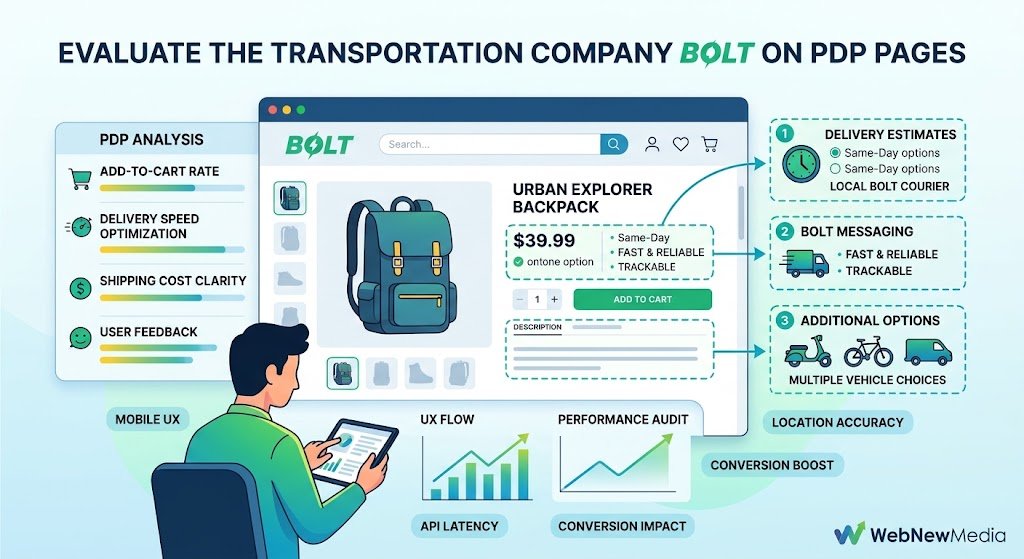
Modern e-commerce success depends heavily on the final stages of the online shopping journey. While product imagery and descriptions attract buyers, delivery speed, shipping costs, and fulfillment transparency often determine whether a customer completes a purchase. Integrating shipping rate calculators, estimated delivery dates, and direct carrier options directly on Product Detail Pages (PDPs) has transformed from a premium feature into a baseline consumer expectation.
When online retailers analyze fulfillment partners, evaluating how logistics providers and checkout solutions present delivery options early in the user journey is critical. This guide examines how store owners, UX designers, and digital strategists can evaluate the transportation company Bolt on PDP pages. By assessing technical integration, visual placement, messaging clarity, and performance impact, merchants can create a friction-free experience that boosts conversion rates and builds customer trust.
The Strategic Importance of Delivery Information on PDP Pages
Product Detail Pages serve as the primary decision-making hub for online shoppers. Displaying clear transportation and fulfillment data directly on the PDP resolves customer hesitation before they enter the checkout funnel.
Reducing Shopping Cart Abandonment
Unexpected shipping costs and unclear delivery timelines rank among the leading causes of cart abandonment. When shoppers must navigate all the way to the final payment step just to calculate freight or local delivery costs, friction increases significantly. Presenting transportation options on the PDP sets clear expectations early.
Enhancing Consumer Trust and Transparency
Modern buyers expect real-time logistics tracking and dynamic delivery windows. When an e-commerce store showcases reputable transportation partners like Bolt alongside precise fulfillment estimates, it reinforces store legitimacy and boosts shopper confidence.
Understanding Bolt: Transportation Logistics vs. One-Click Checkout
When auditing PDP implementations, merchants must distinguish between two prominent entities operating under the brand name Bolt in the digital commerce space:
-
Bolt Mobility / Transportation: The European mobility and logistics network offering ride-hailing, micromobility, parcel delivery, and localized courier services.
-
Bolt Financial / Checkout: The e-commerce technology company providing one-click checkout, fraud protection, and merchant gateway integrations.
Depending on your store model—whether selling physical goods requiring localized courier dispatch or integrating streamlined checkout buttons—evaluating the transportation company Bolt on PDP pages requires assessing how shipping speeds, local fulfillment badges, or checkout widgets render on the page interface.
[User Arrives on PDP]
       │
       ├──> Product Visuals & Specifications
       │
       ├──> Transportation & Delivery Widget (e.g., Bolt Courier / Estimated Time)
       │
       └──> Add to Cart / One-Click Checkout Action
Key Metrics to Evaluate Bolt Transportation Display on PDPs
To measure the effectiveness of displaying transportation choices on product pages, focus on five core evaluation pillars.
1. Visual Hierarchy and Widget Placement
Logistics information should support the primary purchase action without cluttering the screen.
-
Above-the-Fold Visibility: Check whether delivery estimates appear near the price tag or the primary “Add to Cart” button.
-
Mobile Responsiveness: Ensure the delivery banner resizes cleanly on smartphone viewports without pushing purchase buttons below the fold.
2. Real-Time API Accuracy and Speed
Static shipping notes (e.g., “Ships in 2-3 days”) are less effective than dynamic, location-aware estimates.
-
Geo-Location Detection: Evaluates whether the widget detects buyer location via IP or postal code input to show instant courier rates.
-
API Latency: Measure whether fetching transportation rates causes page lag or visual layout shifts (Cumulative Layout Shift).
3. Clear Messaging on Shipping Costs and Cutoff Times
Ambiguity creates hesitation.
-
Cost Transparency: Display whether local Bolt delivery is free, flat-rate, or calculated by weight.
-
Countdown Timers: Verify if ordering cutoff times (e.g., “Order within 2 hrs 15 mins for same-day delivery”) populate accurately.
Evaluating Technical Performance and Site Speed Impact
Adding external logistics widgets or API scripts to PDPs can inadvertently slow down page load speed if not implemented properly.
Managing Third-Party Scripts
External calls to transportation APIs must load asynchronously. If a script blocks critical rendering paths, overall user experience suffers, negatively impacting Google Core Web Vitals and organic search rankings.
Layout Stability and UX Shift
If the delivery estimate widget loads after the main page content, it may push surrounding buttons downward. This visual jump frustratingly causes misclicks on mobile devices. Always allocate fixed container dimensions in your CSS layout to reserve space for incoming transportation data.
Method Comparison: Displaying Transportation Options on Product Pages
Evaluating different approaches to rendering shipping and courier data on product pages helps identify the best fit for your store architecture.
| Evaluation Metric | Direct PDP Shipping Widget | Slide-Out Drawer / Modal | Checkout Step Only |
| Conversion Impact | High (resolves doubt instantly) | Moderate (requires an extra click) | Low (causes high cart drop-off) |
| Page Speed Burden | Requires asynchronous loading | Minimal upfront impact | Zero impact on PDP |
| Mobile UX Fit | Excellent if styled compactly | Good for secondary details | Standard but creates friction |
| Implementation Effort | Medium (API setup required) | Low to Medium | Default platform setup |
Step-by-Step Walkthrough: Conducting a PDP Transportation Audit
Follow this structured workflow to evaluate how transportation options like Bolt perform on your store’s product pages.
[Audit Layout & Copy] ──> [Test Mobile API Latency] ──> [Verify Location Accuracy] ──> [Measure Impact on Speed]
Step 1: Review Copy and Visual Clarity
Examine the PDP desktop and mobile layouts. Ensure delivery icons, carrier branding, and estimated arrival windows are legible, uncluttered, and positioned near the primary call to action.
Step 2: Test Geo-Location and Postal Code Input
Test the page across multiple IP addresses or postal codes. Confirm that local courier availability, micro-mobility delivery slots, or regional shipping rates update accurately without errors.
Step 3: Run Performance Audits
Use PageSpeed Insights or WebPageTest to measure performance metrics before and after enabling the transportation widget. Confirm that Third-Party Blocking Time remains within acceptable limits.
Step 4: Monitor Conversion Rates and A/B Test Results
Run split tests comparing product pages with dynamic transportation widgets against pages with standard static text. Track add-to-cart rates, cart abandonment figures, and total completed checkouts.
Common Challenges and Mitigation Strategies
Integrating real-time transportation choices onto product detail pages introduces specific operational and technical challenges.
Handling Out-of-Zone Delivery Requests
-
The Challenge: Shoppers located outside local courier zones may see error messages or empty delivery widgets.
-
The Solution: Configure fallback messaging that automatically transitions to standard postal or regional freight shipping when local courier service is unavailable.
API Downtime or Slow Server Responses
-
The Challenge: If the transportation provider’s API experiences lag, the delivery widget may display infinite loading spinners.
-
The Solution: Implement strict timeout rules. If the API fails to respond within 500 milliseconds, render default estimated delivery text seamlessly.
Best Practices for Presenting Transportation Partners on PDPs
-
Keep Icons Subtle: Use recognized courier badges or minimalistic transport icons without overwhelming your core brand aesthetic.
-
Prioritize Speed over Detail: Show high-level estimates on the PDP (e.g., “Same-day delivery available”) and reserve detailed tracking breakdowns for post-purchase emails.
-
Align Inventory with Logistics: Ensure the delivery widget syncs with warehouse stock levels so items out of stock locally do not offer impossible same-day delivery slots.
Frequently Asked Questions
Why should I evaluate the transportation company Bolt on PDP pages?
Evaluating how Bolt or any fulfillment provider renders on product pages ensures that shipping costs, local courier options, and delivery timelines are displayed clearly. This transparency eliminates buyer friction early, leading to higher add-to-cart rates and lower overall cart abandonment.
How does displaying delivery options on PDPs impact conversion rates?
Showing accurate shipping estimates directly on product detail pages helps shoppers make immediate purchasing decisions. It eliminates uncertainty about hidden fees at checkout, significantly improving conversion rates compared to stores that conceal shipping costs until payment.
Can adding shipping widgets slow down my product page load times?
Yes, if external transportation scripts are loaded synchronously, they can delay page rendering. To prevent performance drag, load logistics scripts asynchronously and assign dedicated CSS container sizing to avoid layout shifts.
What is the difference between Bolt transportation and Bolt checkout?
Bolt transportation/mobility focuses on vehicle networks, ride-hailing, and localized parcel delivery, whereas Bolt Financial offers one-click checkout software for e-commerce. Evaluating either on PDP pages requires assessing widget rendering, script speed, and user interface alignment.
Should I display exact delivery fees or estimated ranges on the PDP?
Displaying exact fees based on automatically detected customer location provides the best user experience. If precise rates cannot be calculated immediately, providing a clear estimated range alongside a postal code calculator is an effective alternative.
How do I test if my PDP transportation widget is mobile-friendly?
Use browser developer tools to simulate various mobile screen widths. Verify that shipping text remains easy to read, icons scale correctly, and the primary “Add to Cart” or “Buy Now” button remains fully visible above the fold.
What happens if a local courier option is unavailable in the shopper’s area?
Your system should feature an automated fallback. When a buyer’s postal code falls outside the local courier network, the PDP should seamlessly revert to showing national post or standard carrier timelines without displaying system errors.
How do delivery countdown timers on product pages work?
Countdown timers calculate the remaining time before a daily shipping cutoff (e.g., “Order within 1 hr 30 mins for same-day delivery”). They rely on store fulfillment schedules and sync with transport carrier pickup times to encourage prompt purchase decisions.
Conclusion
Evaluating how transportation solutions display on Product Detail Pages is a vital audit step for modern e-commerce brands. Whether providing local courier fulfillment, rapid micro-mobility dispatch, or standard regional freight, presenting shipping information clearly on the PDP directly targets the root causes of cart abandonment.
By auditing visual hierarchy, optimizing script load speeds, ensuring location accuracy, and maintaining seamless mobile responsiveness, online retailers can leverage logistics as a powerful selling tool. Clear transportation messaging turns routine product browsing into confident purchase decisions.
For more insights into digital commerce optimization, site performance auditing, and e-commerce UX best practices, explore additional guides on WebNewMedia.